
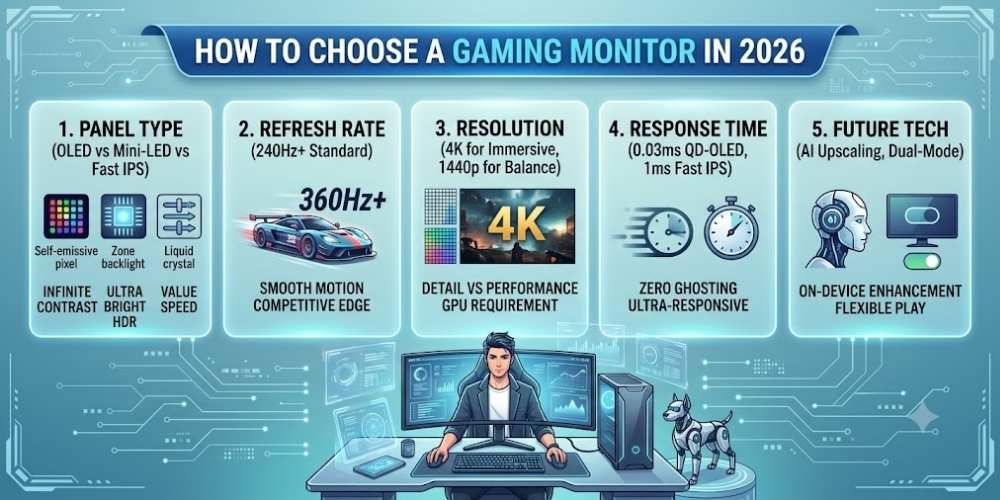
How to Choose a Gaming Monitor in 2026
Choose a gaming monitor in 2026 by comparing resolution, refresh rate, response time, HDR, adaptive sync, panel type, size, and connectivity.
Key Takeaways
- Match resolution and refresh rate to your graphics hardware.
- Use independent response-time and HDR testing.
- Check adaptive-sync compatibility.
- Do not ignore stand quality and connectivity.
Match Resolution to Your Hardware
Higher resolution improves detail but requires more graphics performance.
Choose a resolution that allows your system to reach the frame rates you value.
Refresh Rate and Response
Higher refresh rates improve motion clarity and responsiveness when the computer produces enough frames.
Response-time claims vary, so independent testing is more useful than the smallest advertised number.
Panel Type and Image Quality
Different panel technologies balance contrast, speed, viewing angles, and price.
Look for real measurements of contrast, color, brightness, and motion performance.
Adaptive Synchronization
Adaptive synchronization reduces tearing and uneven motion when frame rate changes.
Check the supported range and compatibility with your graphics hardware.
HDR
Good HDR requires sufficient brightness, contrast control, color range, and content support.
An HDR label alone does not guarantee a strong experience.
Size, Ergonomics, and Ports
Choose a size appropriate for viewing distance and desk depth.
Height adjustment, input switching, USB hubs, and cable management can improve daily use.
Practical Buying Checklist
- Define the main problem you want to solve.
- Set a realistic budget including accessories and service costs.
- Compare independent tests instead of relying only on advertising.
- Check warranty, update policy, repair options, and return terms.
- Choose the product or workflow that is easiest to use consistently.
Frequently Asked Questions
Is a higher refresh rate always better?
It is most useful when the system can produce high frame rates and the games benefit from fast response.
What monitor size is best for gaming?
It depends on resolution, desk depth, and viewing distance. Common choices balance immersion with comfortable visibility.
Is HDR important for gaming?
It can be excellent on capable displays, but basic HDR support may add little.
Make Smarter Technology Decisions
Explore more practical buying guides, reviews, security tips, and technology explainers from HoverProTech.
Browse Latest Guides
Ethan Walker is a technology writer at HoverProTech with a passion for smartphones, AI, laptops, software, and consumer electronics. He specializes in product reviews, buying guides, and technology news, helping readers stay informed with accurate, practical, and easy-to-understand content.