
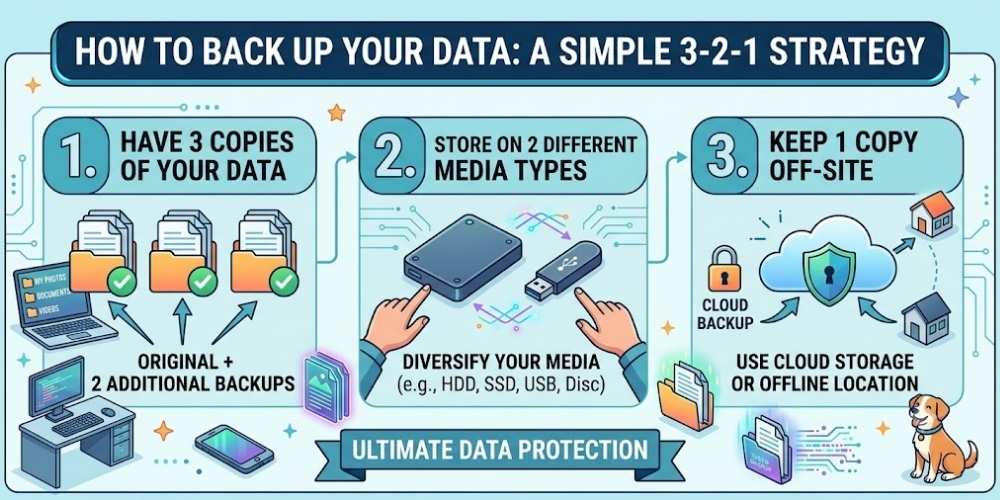
How to Back Up Your Data: A Simple 3-2-1 Strategy
Protect important files with the 3-2-1 backup strategy using multiple copies, different storage types, off-site protection, and recovery testing.
Key Takeaways
- Keep three copies on two storage types with one off-site.
- Automate backups whenever possible.
- Protect backup copies from ransomware.
- Test recovery before an emergency.
What the 3-2-1 Rule Means
Keep three copies of important data, on two different storage types, with one copy stored off-site.
The rule reduces risk from device failure, theft, fire, ransomware, and accidental deletion.
Choose What to Back Up
Prioritize documents, photos, business records, project files, and account recovery information.
Applications can often be reinstalled, but unique personal and business data cannot be replaced.
Local Backups
External drives provide fast recovery and large capacity.
Disconnect or protect backup drives so ransomware cannot easily encrypt every copy.
Cloud and Off-Site Backups
Cloud backup provides geographic separation and automatic scheduling.
Review encryption, retention, version history, and recovery speed.
Automate the Schedule
Automatic backups reduce reliance on memory.
Use a schedule that matches how frequently your files change.
Test Recovery
A backup is only useful when it can be restored.
Test sample files regularly and document the steps needed for full recovery.
Practical Buying Checklist
- Define the main problem you want to solve.
- Set a realistic budget including accessories and service costs.
- Compare independent tests instead of relying only on advertising.
- Check warranty, update policy, repair options, and return terms.
- Choose the product or workflow that is easiest to use consistently.
Frequently Asked Questions
Is cloud storage the same as backup?
Synchronization alone is not always a complete backup. A backup service should offer retention and version recovery.
How often should I back up?
Back up according to how much recent work you can afford to lose.
Should an external backup drive stay connected?
Continuous connection is convenient, but a disconnected or otherwise protected copy improves ransomware resilience.
Make Smarter Technology Decisions
Explore more practical buying guides, reviews, security tips, and technology explainers from HoverProTech.
Browse Latest Guides
Ethan Walker is a technology writer at HoverProTech with a passion for smartphones, AI, laptops, software, and consumer electronics. He specializes in product reviews, buying guides, and technology news, helping readers stay informed with accurate, practical, and easy-to-understand content.