
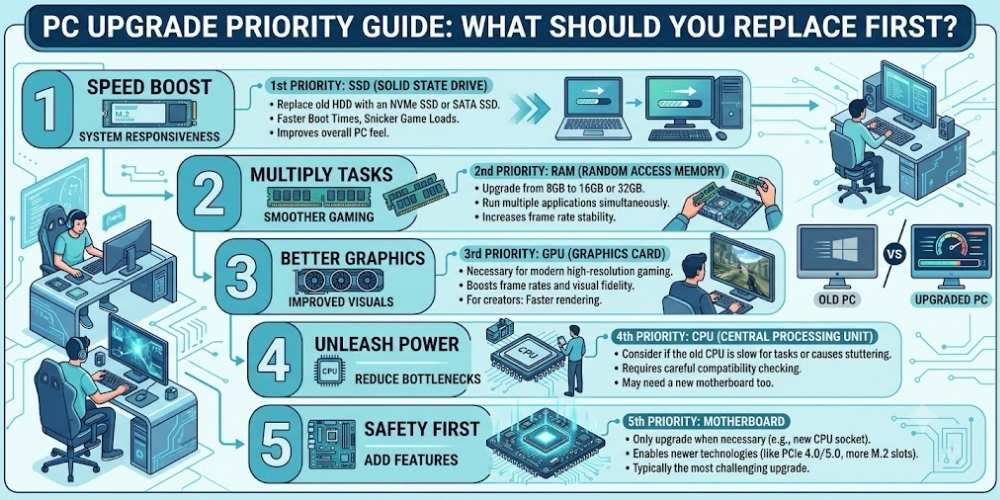
PC Upgrade Priority Guide: What Should You Replace First?
Decide what to upgrade first in a PC by identifying bottlenecks in graphics, processor, memory, storage, cooling, power, and display.
Key Takeaways
- Identify the actual bottleneck before buying.
- Check compatibility, power, and case space.
- Enough memory matters more than small speed differences.
- Do not overlook the monitor, cooling, and storage.
Start With the Problem
Define what is slow: game frame rate, loading, multitasking, rendering, storage, or noise.
An upgrade should solve a measured limitation.
Graphics Card
A graphics upgrade often has the largest impact on gaming at higher settings or resolutions.
Check power supply capacity, case clearance, and processor balance first.
Processor and Platform
A processor upgrade helps high-frame-rate gaming, simulation, compiling, and certain creative workloads.
Platform changes may require a new motherboard and memory.
Memory
More memory helps when active use approaches the installed capacity.
Faster memory offers smaller gains than having enough capacity.
Storage
A solid-state drive greatly improves responsiveness when replacing a hard drive.
Additional fast storage can reduce loading and project transfer times.
Cooling, Power, and Display
Cooling improves sustained performance and noise, while a quality power supply protects stability.
A better monitor can deliver a larger visible improvement than a small internal upgrade.
Practical Buying Checklist
- Define the main problem you want to solve.
- Set a realistic budget including accessories and service costs.
- Compare independent tests instead of relying only on advertising.
- Check warranty, update policy, repair options, and return terms.
- Choose the product or workflow that is easiest to use consistently.
Frequently Asked Questions
What is the best first upgrade for an old PC?
Replacing a hard drive with an SSD is often the biggest everyday improvement. For gaming, the graphics card may matter most.
How do I know whether I need more RAM?
Monitor memory use during your normal workload. Frequent near-full usage suggests more capacity could help.
Should I upgrade the CPU or GPU first?
It depends on whether your workload is limited by graphics or processor performance.
Make Smarter Technology Decisions
Explore more practical buying guides, reviews, security tips, and technology explainers from HoverProTech.
Browse Latest Guides
Ethan Walker is a technology writer at HoverProTech with a passion for smartphones, AI, laptops, software, and consumer electronics. He specializes in product reviews, buying guides, and technology news, helping readers stay informed with accurate, practical, and easy-to-understand content.