
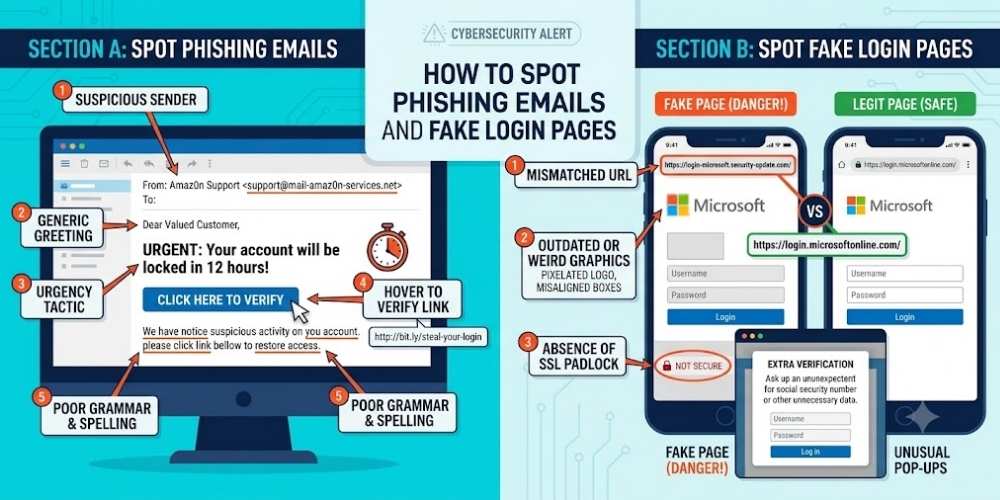
How to Spot Phishing Emails and Fake Login Pages
Learn how to spot phishing emails and fake login pages by checking senders, links, urgency, attachments, domains, and authentication prompts.
Key Takeaways
- Slow down when a message creates urgency.
- Check the complete sender and destination domain.
- Use bookmarks or official apps for sensitive logins.
- Act quickly after suspected compromise.
Watch for Manufactured Urgency
Phishing messages often pressure users to act immediately.
Pause when a message threatens account closure, payment loss, or legal consequences.
Inspect the Sender
Display names can be forged, so check the full address.
Look for misspellings, unusual domains, and unexpected reply-to addresses.
Check Links Safely
Hover over links on desktop or press and hold on mobile to preview the destination.
Avoid entering credentials after opening a link from an unexpected message.
Examine the Login Page
Fake pages may copy logos and layout but use a different domain.
Password managers can help because they usually autofill only on the correct site.
Treat Attachments Carefully
Unexpected documents, archives, and executable files can carry malware.
Confirm unusual attachments through a separate communication channel.
Report and Recover
Report suspicious messages to the relevant provider or security team.
If credentials were entered, change the password from a trusted device and review active sessions immediately.
Practical Buying Checklist
- Define the main problem you want to solve.
- Set a realistic budget including accessories and service costs.
- Compare independent tests instead of relying only on advertising.
- Check warranty, update policy, repair options, and return terms.
- Choose the product or workflow that is easiest to use consistently.
Frequently Asked Questions
Can a phishing email look professional?
Yes. Attackers can copy branding, signatures, and writing style convincingly.
What should I do after clicking a suspicious link?
Do not enter information. Close the page, scan the device if needed, and report the message.
What if I entered my password?
Change it immediately from a trusted device, enable multi-factor authentication, and review account sessions.
Make Smarter Technology Decisions
Explore more practical buying guides, reviews, security tips, and technology explainers from HoverProTech.
Browse Latest Guides
Ethan Walker is a technology writer at HoverProTech with a passion for smartphones, AI, laptops, software, and consumer electronics. He specializes in product reviews, buying guides, and technology news, helping readers stay informed with accurate, practical, and easy-to-understand content.