
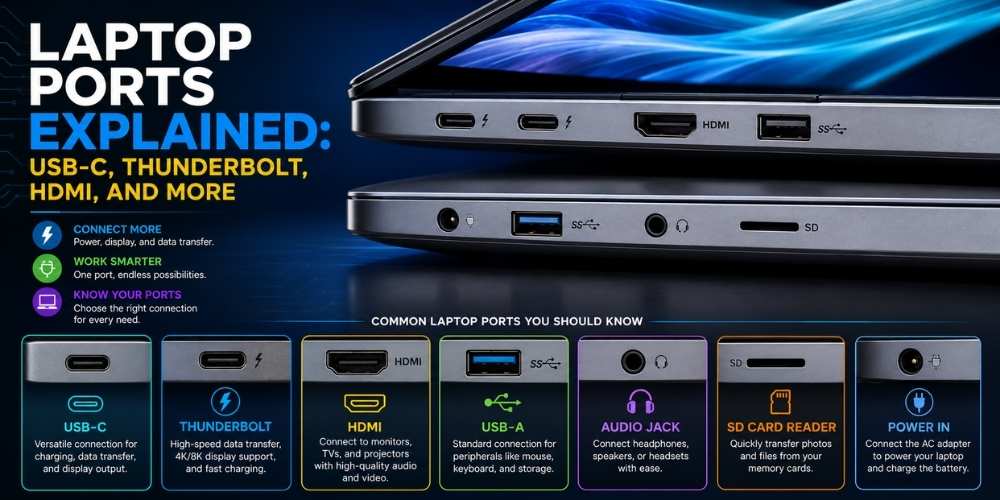
Laptop Ports Explained: USB-C, Thunderbolt, HDMI, and More
Understand laptop ports including USB-C, Thunderbolt, USB-A, HDMI, card readers, charging, docks, and external monitor support.
Key Takeaways
- USB-C capabilities vary by device.
- Check display output and charging support before buying.
- A dock can simplify a desk setup.
- Use quality cables that match required speeds and power.
USB-C Is a Connector, Not a Guarantee
USB-C can carry data, charging, video, or multiple functions, but capabilities vary.
Check the laptop specification for each port rather than assuming all USB-C ports are equal.
High-Speed Multi-Purpose Ports
Advanced ports can support fast storage, docks, external graphics, and multiple displays.
Cable quality and device compatibility affect real performance.
HDMI and Display Output
HDMI is convenient for monitors, televisions, and projectors.
Confirm maximum resolution, refresh rate, and whether the laptop can drive multiple displays.
USB-A and Legacy Devices
USB-A remains useful for mice, keyboards, storage, and specialized equipment.
A compact hub can replace missing ports, but direct connections are often more reliable.
Memory Card Readers and Audio
Photographers and creators should check card format and transfer speed.
Headphone jacks remain useful for low-latency audio and simple compatibility.
Choosing a Dock
A good dock should match charging needs, display requirements, network speed, and peripheral count.
Prefer reputable models with adequate power and firmware support.
Practical Buying Checklist
- Define the main problem you want to solve.
- Set a realistic budget including accessories and service costs.
- Compare independent tests instead of relying only on advertising.
- Check warranty, update policy, repair options, and return terms.
- Choose the product or workflow that is easiest to use consistently.
Frequently Asked Questions
Can every USB-C port charge a laptop?
No. The laptop and port must support charging input.
Can a USB-C port connect to a monitor?
Only if it supports video output. Check the technical specification.
Do docks reduce performance?
They can share bandwidth across devices, so choose a dock and connection standard that match your workload.
Make Smarter Technology Decisions
Explore more practical buying guides, reviews, security tips, and technology explainers from HoverProTech.
Browse Latest Guides
Ethan Walker is a technology writer at HoverProTech with a passion for smartphones, AI, laptops, software, and consumer electronics. He specializes in product reviews, buying guides, and technology news, helping readers stay informed with accurate, practical, and easy-to-understand content.